• English
  • 简体中文
  • 繁體中文
  • 한국어
  • ภาษาไทย
  • Bahasa Melayu
  • 日本語
pixivision
Make it interesting
Tag List
Explore
  • Illustrations
  • Manga
  • Novels
Create
  • Tutorials
  • Behind the Art
  • Materials
Discover
  • Interviews
  • Columns
  • News
  • Top
  • Behind the Art
  • A making-of & interview with Kitsune: painting fantastic worlds with Adobe Photoshop CC
Behind the ArtPR
2016.11.10

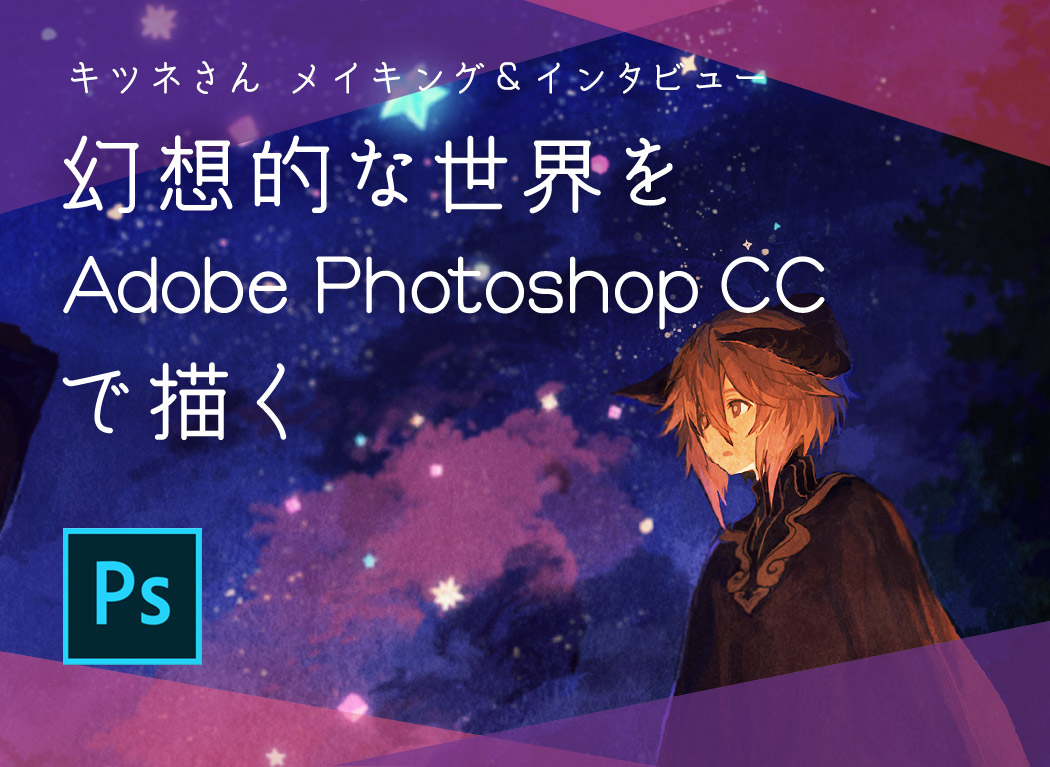
A making-of & interview with Kitsune: painting fantastic worlds with Adobe Photoshop CC
  • interview
  • illustrator interviews
  • making-of
  • illustration material&software

Interview & article by: Youhei Ogawa

Kitsune's illustrations portray fantastic but sophisticated environments; they invite the viewer to get lost in mysterious and fascinating worlds, also thanks to her unique use of colors.
Kitsune is currently working with many magazines and novels, but also dedicates herself to personal illustrations and short movies.
Today we asked her about her favorite painting software, Adobe Photoshop CC, about her origins and about her present and future goals.

Sketch

Let's start with a black&white sketch.
The brush set I'm using is called "FREE PHOTOSHOP/GIMP BRUSHES!+Explanation by JonasDeRo", it's a free custom set. In particular, I'm using this hexagonal brush called "Hexagon" to paint the initial sketch.
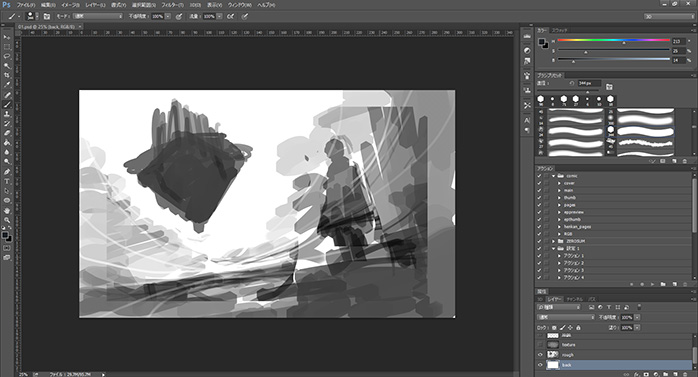
▲ The initial black and white sketch

In the first sketch the character, the background and the castle were all pretty big and occupied a considerable part of the canvas. The arrangement was quite simple and it didn't look very dynamic yet.
I tried to tilt the illustration and shift the eye-level, so now you can perceive the space better.


I create a new layer on top of the sketch one and roughly add colors. I set the layer mode to "multiply".
After I'm done with the basic colors, I create another layer and set it to "overlay", then I paint over the bits that are supposed to reflect light (the castle, stars, the space around the lamp in the bottom-right part of the screen and so on).

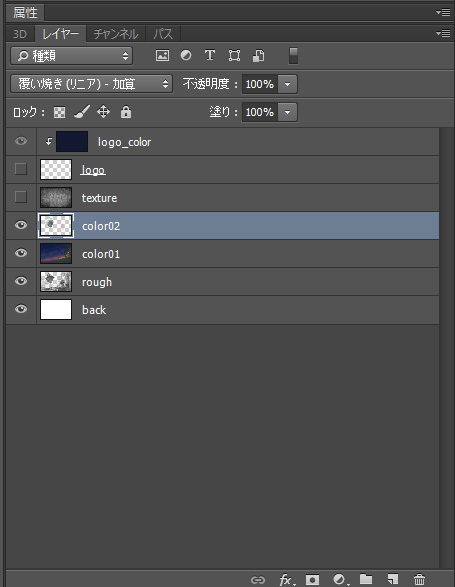
▲ The sketch is now completed.

At this point, the general atmosphere is decided.

Coloring

After I decide the overall atmosphere, I add colors. In my case, I like to paint by heart and decide on details as I proceed, so I don't use a lineart. If I make mistakes or change my mind about something, I just paint over it.

Adjusting the overall brightness

I already imagined how bright I want my illustration to be during the sketch phase, so I merge all the layers and add some more details.

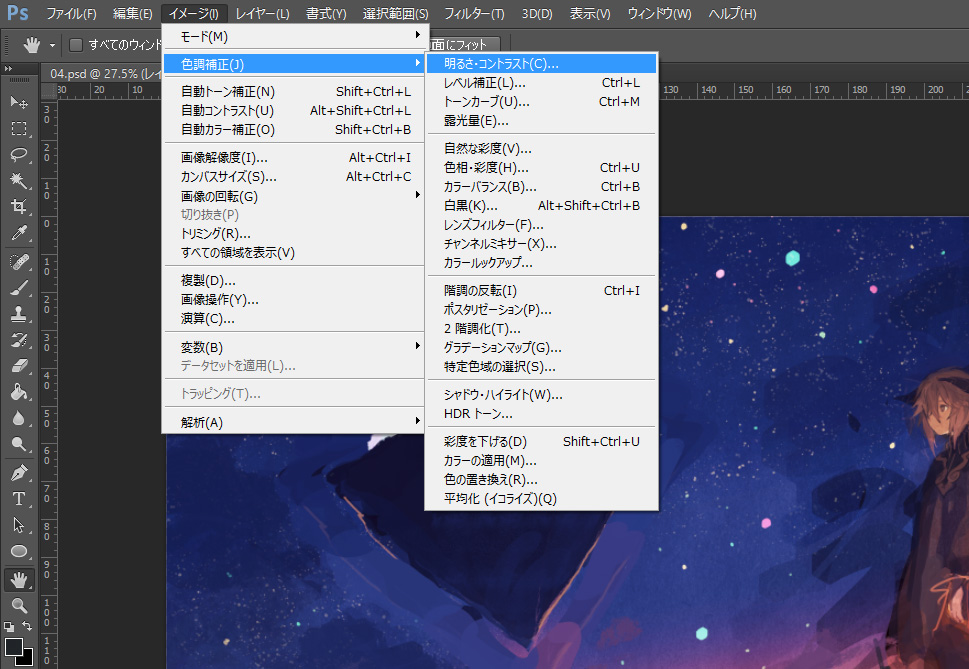
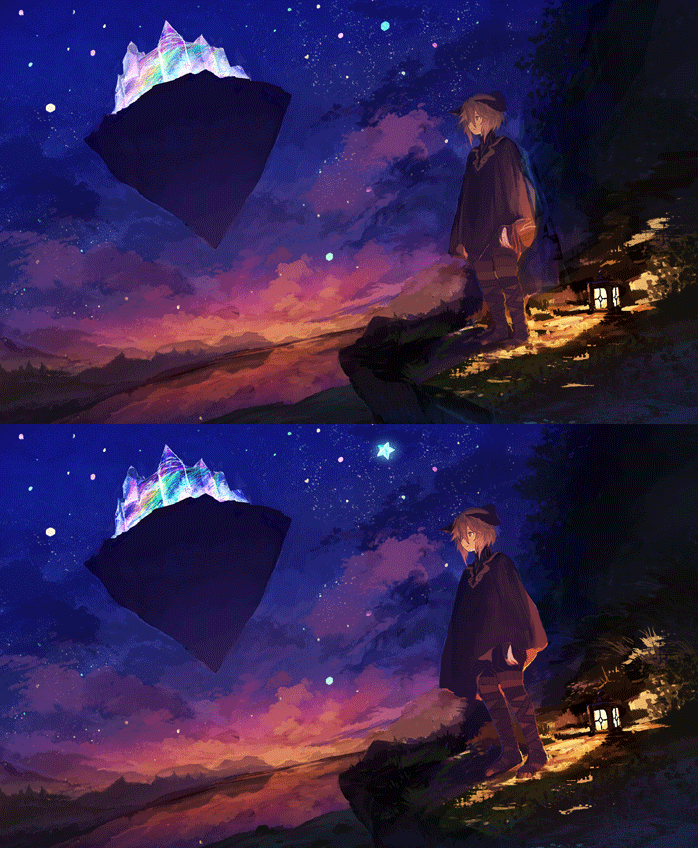
▲ After adding some details to the character, I realized the illustration was pretty dark. I adjust the brightness by selecting "Image"→"Adjustments"→"Brightness/Contrast".

▲ While adjusting the overall brightness of my illustration, I also fix the various lights coming from the light sources.

When I feel I've added enough details, I merge all layers once again and re-adjust brightness and contrast.

Adjusting the composition balance, painting the background
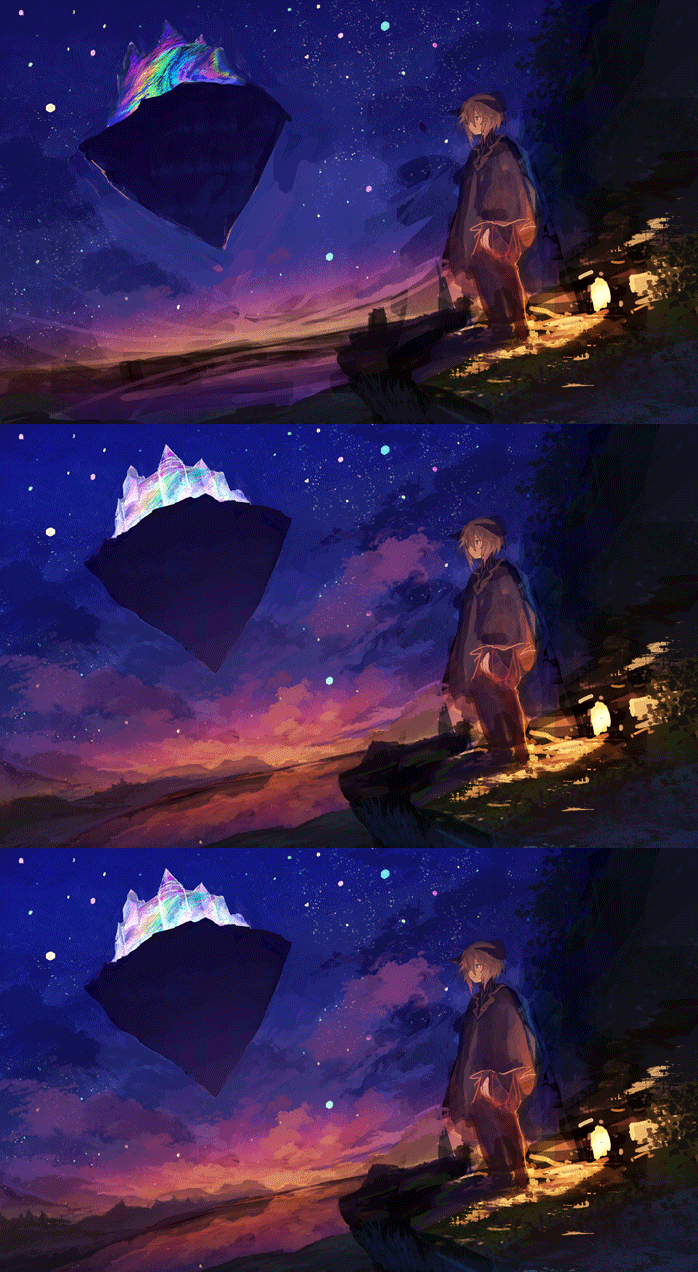
I want to emphasize even more that the eye-level in this illustration is really low, so I move the castle up and fix the castle, the sky and the background.

I wanted the castle to look like a glass sculpture or a soap bubble, so I add a gradation and make some adjustments to its shape.


I change the sky colors lightly so they fit the castle. I draw some clouds starting from the brightest section, at the bottom, and make them bigger in the top part so it gives a sense of depth. I change the gradation to orange -> pink -> purple -> blue.

Lastly, I add some details to the part next to the horizon. After painting a distant view resembling mountains, I proceed to fill in the two sides making the mountains bigger and adding some tree silhouettes.

Drawing the character
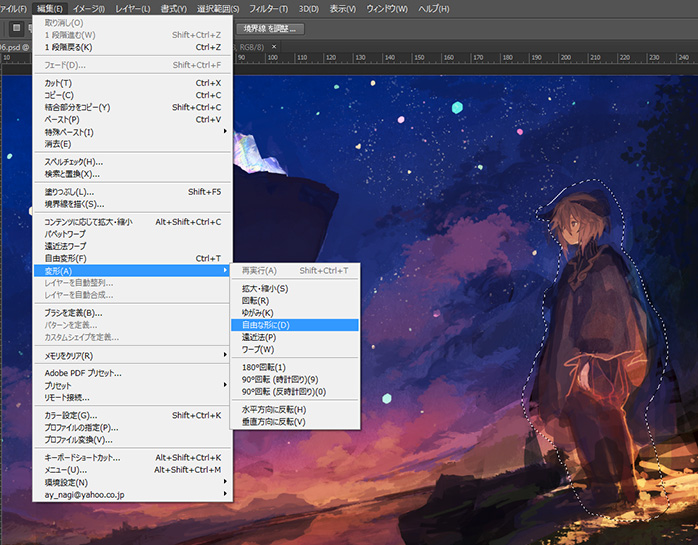
The background is almost done, so it's time to concentrate on the character. After I add details to the lamp, our light source, I switch to the character.

I adjust the character's balance using "Edit" -> "Transform" -> "Distort" and make it look closer to the viewer, while fixing the perspective.

Finish

I add details to the remaining parts, and now we can say we're 80% done. The last step is to add even more details and some effects in order to make the illustration more consistent.

Adding parts and fine details

I felt there was something missing in order to make this illustration interesting, so I added a camera and a tripod. I also added some more stars on a new layer.

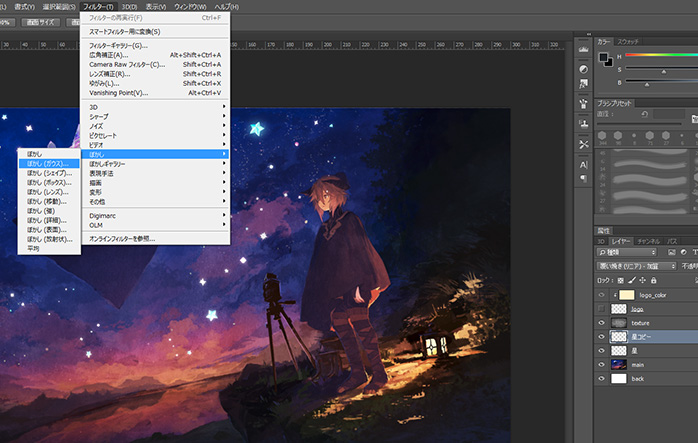
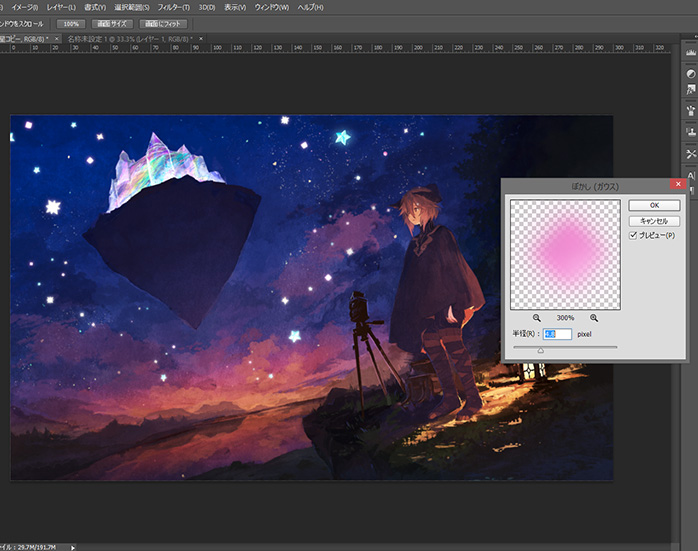
My strategy to make the stars and the castle look so bright is the following: on the stars layer, select "Filter" -> "Blur" -> "Gaussian Blur", then set the layer mode to "Linear Dodge". I did the same for the castle.

Lastly, I add a kraft paper texture and set the blending mode to "Soft light", before merging all the layers again.

Final adjustments
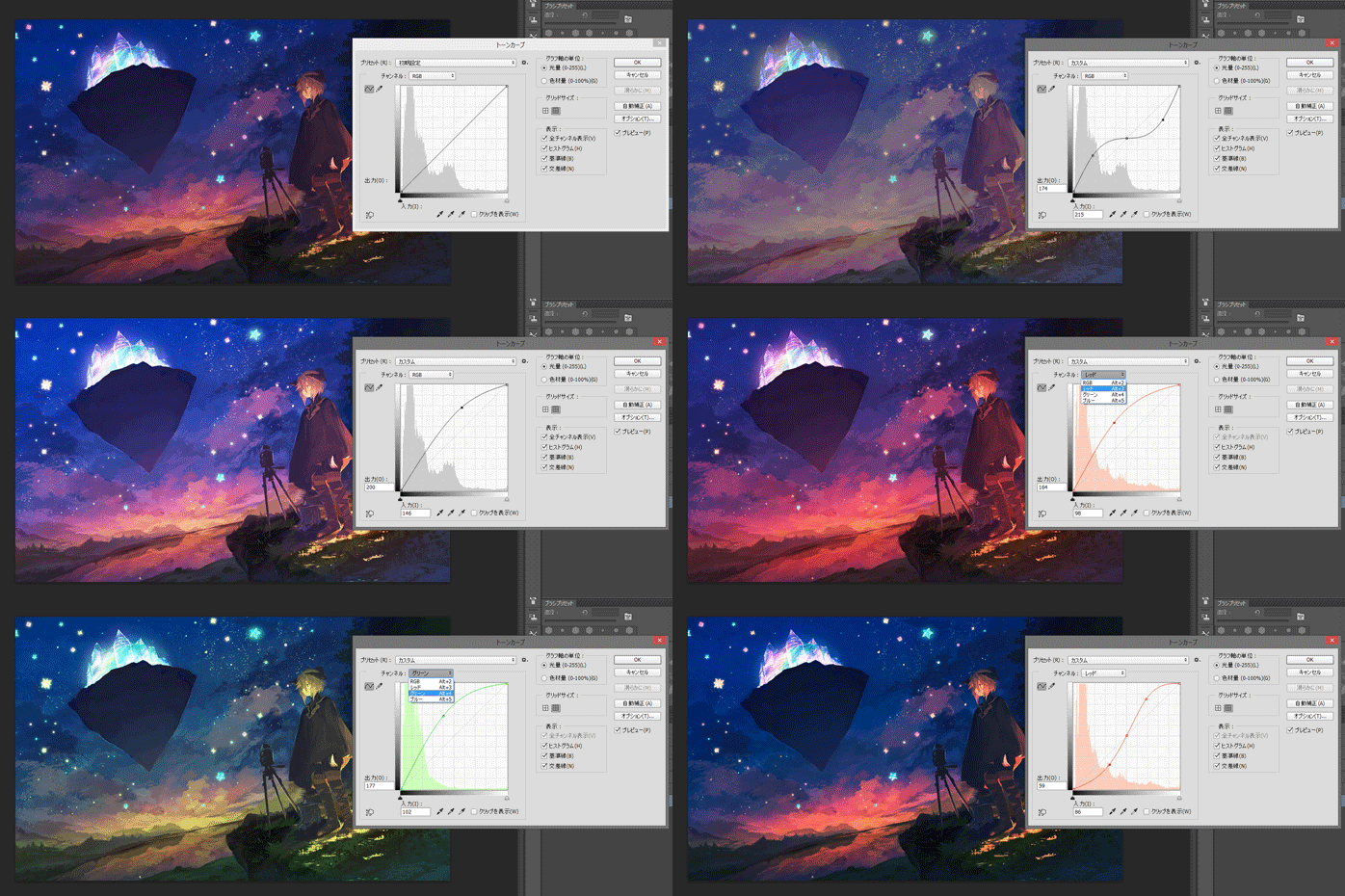
I decide the overall color scheme by adjusting the tint and I sharpen the image edges.

I open "Image" -> "Adjustments" -> "Curves" and adjust the RGB curves. I increase the reds (R) for the light reflecting parts and in the same way I increase the blues (B) for the night sky. In order for the character skin to be of the right color, I decrease the greens (G) just a little bit.

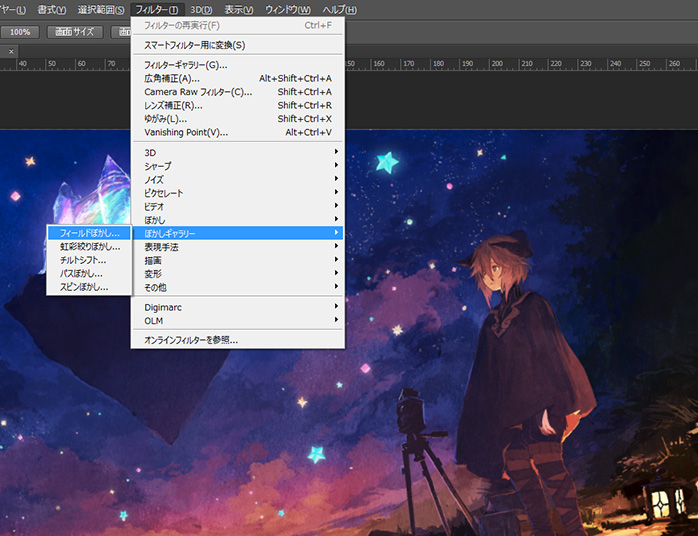
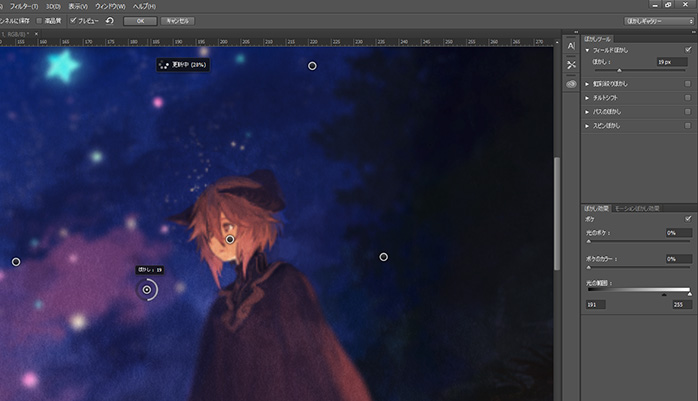
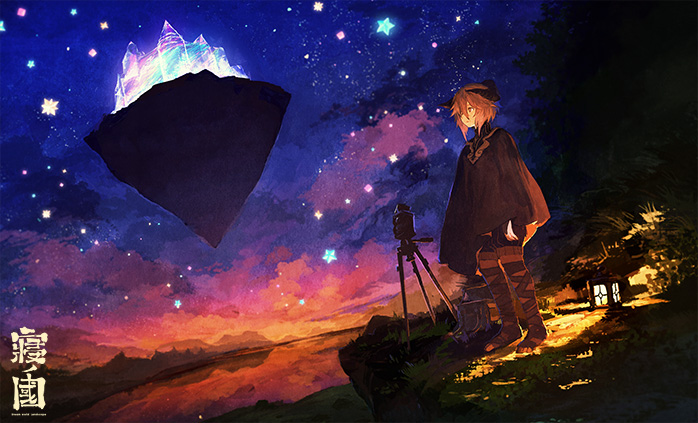
The following is a function you can only find in Adobe Photoshop CC. I select "Blur Gallery" -> "Field Blur" and adjust the image so that the character and the castle appear perfectly sharp while part of the background looks out of focus. Lastly, I select "Filter" -> "Sharpen" -> "Smart Sharpen" and sharpen the edges of my illustration.

Done!

Adobe Photoshop CC is really convenient! There are many functions you can use when you're finished painting, in order to increase the quality of your work dramatically.

Thank you for your hard work!

On Adobe's website, you'll find an even more detailed tutorial.

On the next page you can read Kitsune's interview! We're gonna ask her what brought her to draw such fairytale-like sceneries, and about the secrets behind her talent!


Next Page : Her driving force was "frustration". Kitsune tells us about her origins
123

Newest articles tagged interview

  • Behind the scenes with illustrator Tokkyu! How does she refine her personal style and add sparkle to her work?

    Behind the scenes with illustrator Tokkyu! How does she refine her personal style and add sparkle to her work?

  • Illustrator Nagu shares her tips for remaking old artwork - Redrawing something with improved skills!

    Illustrator Nagu shares her tips for remaking old artwork - Redrawing something with improved skills!

  • Interview with Mimimi, the Grand Prize winner of the pixiv High Schoolers Illustration Contest 2025 - “Illustration is just a part of my life.”

    Interview with Mimimi, the Grand Prize winner of the pixiv High Schoolers Illustration Contest 2025 - “Illustration is just a part of my life.”

  • Behind the scenes with illustrator NAKDI! How does she bring characters to life and why does she like sharing works-in-progress?

    Behind the scenes with illustrator NAKDI! How does she bring characters to life and why does she like sharing works-in-progress?

If you liked interview, you will also love...

  • "Being true to what you love is essential." - Interview with Popular llustrator Mika Pikazo

    "Being true to what you love is essential." - Interview with Popular llustrator Mika Pikazo

  • Interview with redjuice and Mai Yoneyama - My decade of experience as a working adult has taught me that there are things more important than illustration technique.

    Interview with redjuice and Mai Yoneyama - My decade of experience as a working adult has taught me that there are things more important than illustration technique.

  • Rella making-of and interview - Drawing a peaceful and elegant world with Adobe Photoshop CC

    Rella making-of and interview - Drawing a peaceful and elegant world with Adobe Photoshop CC

  • How illustrator Namie conceptualizes and breathes life into each illustration - It all starts with the medium.

    How illustrator Namie conceptualizes and breathes life into each illustration - It all starts with the medium.

  • How Are Creators Enjoying "Pawoo"? An Interview With Kazuharu Kina

    How Are Creators Enjoying "Pawoo"? An Interview With Kazuharu Kina

  • Being a manga artist was my calling - Interview with Kabi Nagata

    Being a manga artist was my calling - Interview with Kabi Nagata

  • Learning the Essence of Anime Painting from Illustrator Ogipote - “I want to create tear-jerking illustrations”

    Learning the Essence of Anime Painting from Illustrator Ogipote - “I want to create tear-jerking illustrations”

Share this article
  • Share
  • Post
  • Share
  • Post

Tags:

  • interview
  • illustrator interviews
  • making-of
  • illustration material&software
Follow pixivision on Facebook!
Find us on X too!
Follow @pixivision
Stay updated with pixivision's daily features!

Newest articles tagged Behind the Art

  • The Making of 13 Copic Drawings - A Lesson in Coloring

    The Making of 13 Copic Drawings - A Lesson in Coloring

  • The Making of 15 Watercolor and Colored Pencil Drawings - A Glimpse Behind the Scenes

    The Making of 15 Watercolor and Colored Pencil Drawings - A Glimpse Behind the Scenes

  • Are you ready for Comiket? Useful Techniques For Your Event Booth

    Are you ready for Comiket? Useful Techniques For Your Event Booth

  • Wait a second! (Almost) Useless Tutorials

    Wait a second! (Almost) Useless Tutorials

View more▶︎

Follow pixivision's
official accounts!

p-chanMonthly Ranking
  • Illustrations

    Drawings of Pools at Night - After ...

  • Illustrations

    [Featured Articles] Summer Illustra...

  • Illustrations

    Drawings of Streaked Hair - Lucky S...

  • Illustrations

    Drawings of Flared and Frilled Biki...

  • Illustrations

    Drawings of White Bikinis VS Black ...

p-chanFeatured
  • Illustrations

    Fan Art of Gold Ship from Umamusume...

  • Illustrations

    Drawings of Pools at Night - Dreami...

  • Interviews

    Behind the scenes with illustrator ...

  • Illustrations

    Drawings Featuring Sandals - Light ...

  • Illustrations

    Drawings Featuring Girls’ Belly But...

Follow pixivision's
official accounts!

  • Top
  • About pixivision
  • Suggest a theme
  • English
  • 简体中文
  • 繁體中文
  • 한국어
  • ภาษาไทย
  • Bahasa Melayu
  • 日本語
  • pixivision
  • About pixiv Inc.
  • Terms of Use
  • Contact Us
  • Advertising
  • Privacy Policy
©pixiv