• English
  • 简体中文
  • 繁體中文
  • 한국어
  • ภาษาไทย
  • Bahasa Melayu
  • 日本語
pixivision
Make it interesting
Explore
  • Illustrations
  • Manga
  • Novels
Create
  • Tutorials
  • Behind the Art
  • Materials
Discover
  • Interviews
  • Columns
  • News
  • Top
  • メイキング
  • 【講座】SAIメイキング by ざいんさん【お絵かきIRADUKAI もう一度読みたい講座特集1】
メイキング
2015.08.04

【講座】SAIメイキング by ざいんさん【お絵かきIRADUKAI もう一度読みたい講座特集1】

  • making-of
  • illustration material&software
  • author's commentary
  • IRADUKAI
  • SAI

3.塗り・背景

▼街並み編

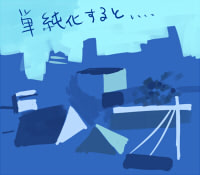
遠景はなんとなく、青の中でもブルー寄りのベースを敷きました。

ブルーだけだと浮くので、手前の緑よりの色もスポイト。

明るい部分をぽつぽつ描いたあと、隣に影っぽい暗い色を添えていく、の繰り返し。
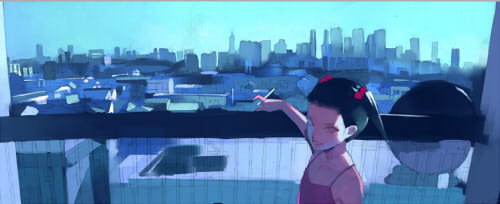
拡大

簡単に言うと前項目の色作成表の方法で作った色で、△や□を適当に組み合わせて「街並み」っぽく見せてるだけです。遠くの建物ほど描き込みと明暗差は控えめにして、シルエットだけにとどめておきましょう。

▼自転車編

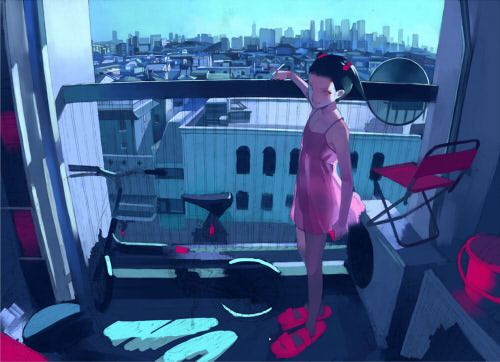
最もコントラストが高い部分の一つ。
金属製の固さを出すために、ハイライトは「鉛筆」でのせることが多いです。
ハイライトが正しく入っていると、非常にらしく見えやすいです。

描写の仕方自体は街並みとあまり変わらないのですが、もう少し正確さが求められます。
実物を参考にしたりして根気よくこつこつ
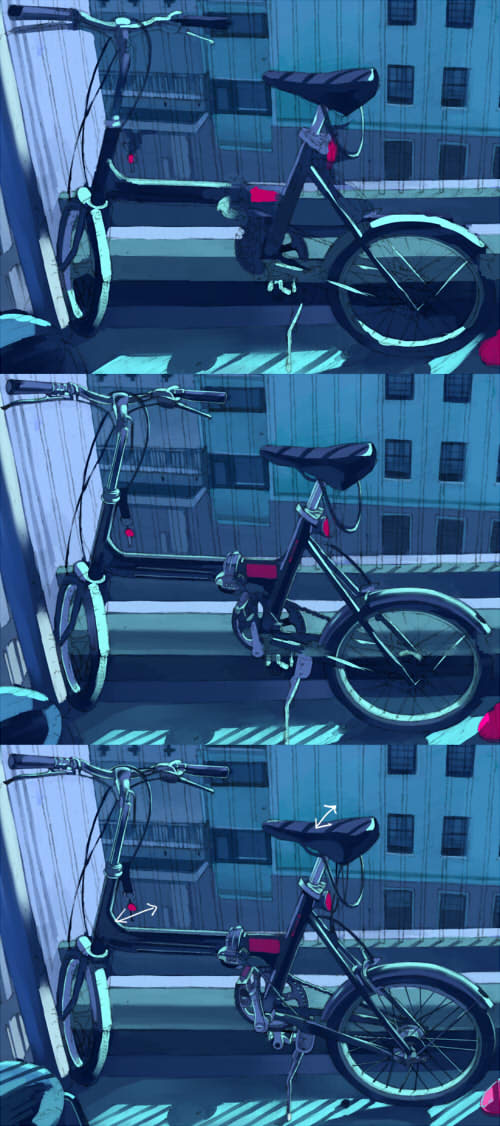
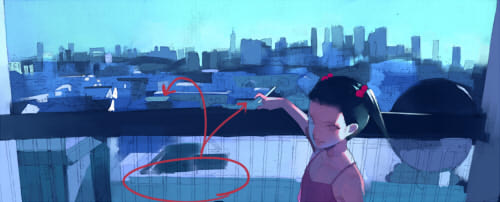
※3枚目の白い矢印について
自転車のようなモチーフは、ついついそのものばかり描いてしまいがちですが、背景との関係にも気を付けながら塗ることが重要です。
特に今回の絵の場合、後ろの建物が遠くにあり空間が抜けているので。

矢印部分などを見ると分かると思うのですが、ハイライトの隣には暗い色、暗い色の隣にはそれより明るい色、と意識的に対比をつけて距離感を表現しています。

▼影編
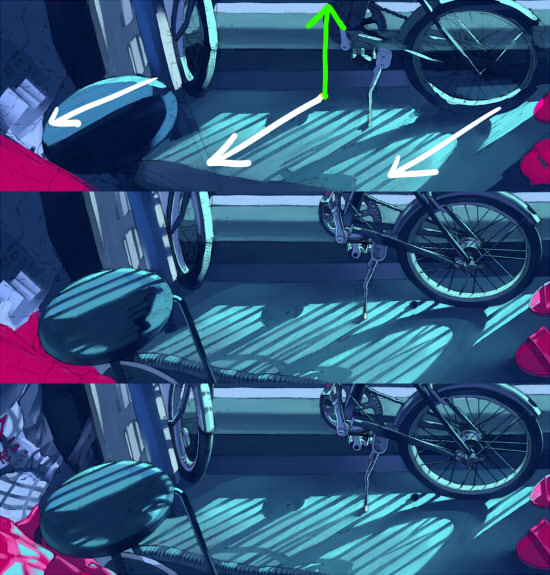
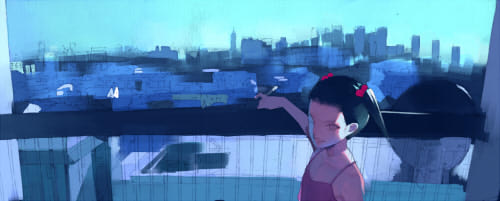
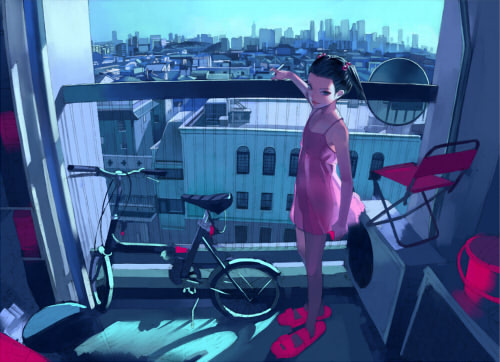
影は、陰影が強い今回の絵において目立つ部分ではありますが、影にかけている時間はそれほど長くありません。

1. 物に対する影の角度(1枚目の矢印の関係)をきちんと設定する。
2. 明るい部分は彩度が高めで、影は彩度が低い。
3. 床の部分など平らな場所の影のグラデーションはやや丁寧に。(ぼかしツールを使用しました)


この3つに気をつけていると、かなりそれらしくなると思います。

▼全体像

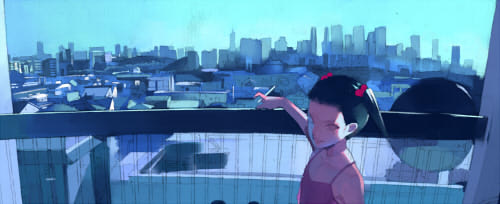
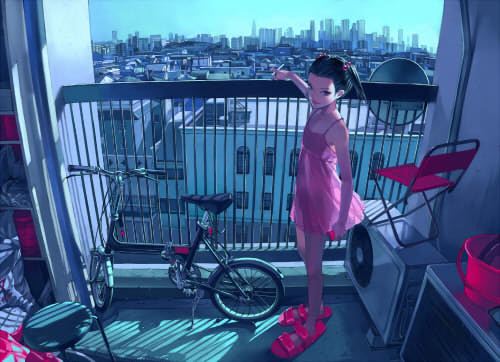
塗り作業は、部分部分というより下塗りの延長で全体を見ながらやっていくわけですが、建物、自転車、影は画面上で目立つ部分ですので重点的に説明しました。
この3点が描ければ、他も特に難しいことはないと思います。

ちなみに全体像はこんな風に進行しています。参考までに。
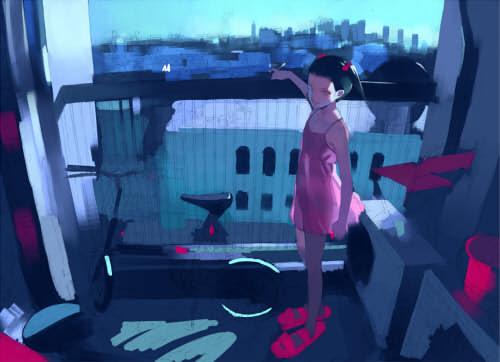
次の項目では、キャラの塗りについて集中的に説明したいと思います。

4.塗り・人物

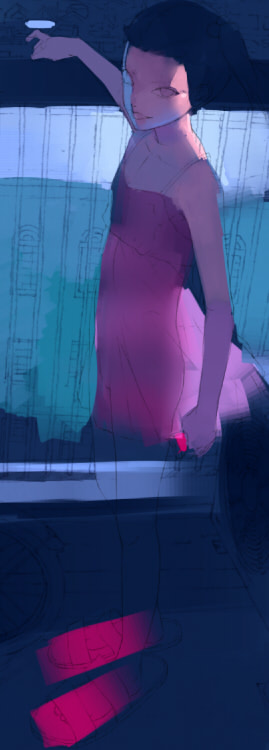
人物のベースはこんな感じです。
青い下地に対して赤〜オレンジ系の色を、筆圧に強弱を付けながらのせています。光の当たっているところが強め。
▼顔
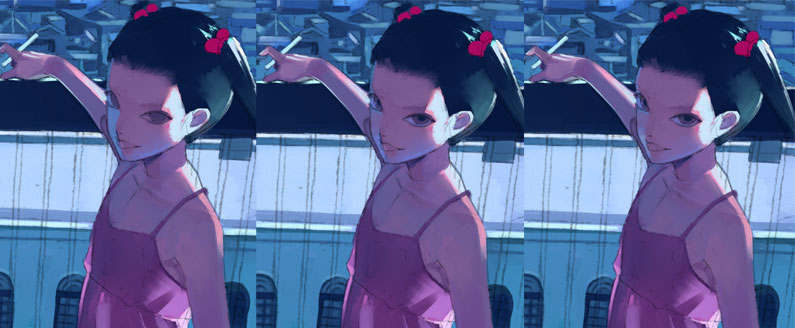
左から

1:顔と肩の一部は光でとんだ風にしたかったので、水色系の白を強くのせました。
  左側は回り込む部分なので彩度の低い青をのせました。あごのあたりにもうすーく。
2:左の青がきつかったので、右からスポイトでとった赤系でグラデーションを作ります。
  同時進行で目の暗い部分も描き始めました。
3:青の部分をもう少し白っぽくして、反射光のようにしました。
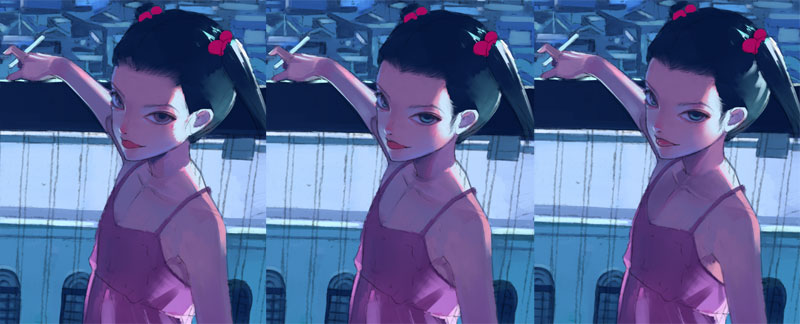
左から

4:鼻の先に反射光っぽいハイライトを追加。舌や鼻の頭に赤みも少し足しました。
5:目にグリーン系の色を入れました。
6:頬の柔らかさを出すために「ぼかし」ツールでぼかしました。

▼髪
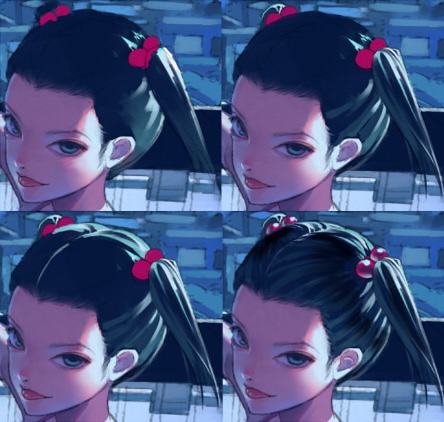
髪は光が当たっている部分を白〜水色で強く描き、影の部分は弱めに。
光の部分とその他影の部分の境目には、黒に近い強い色をのせています。(立体感を出すため)

▼服
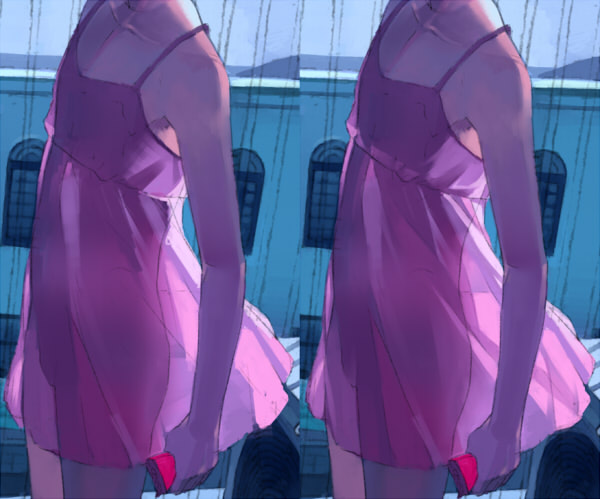
筆のストロークでおおまかな流れをつくったあとに、皺(しわ)を描き込みます。
左側から風が吹いている設定なのでそれを意識しつつ。
半透明ぐらいの質感を想定しているので身体のラインもぼんやり描いています。
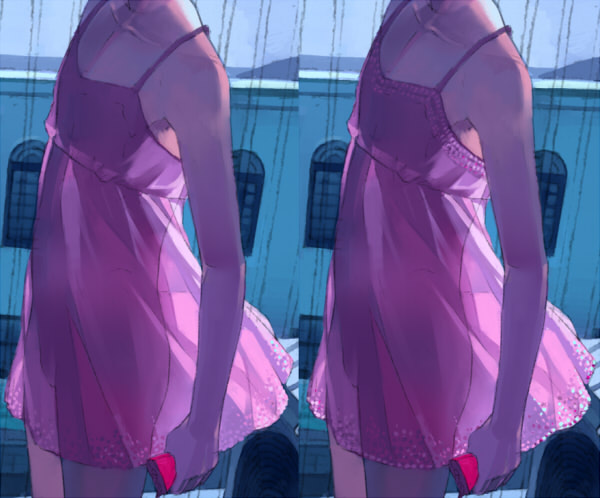
浮かない程度の明るい色をスポイトして、点描でレースっぽいものを描きます。
縮小した時にそれらしく見えればいいので、適当で良いです。
仕上げに、彩度高めの赤ピンクも入れました。

▼人物全体の補足説明
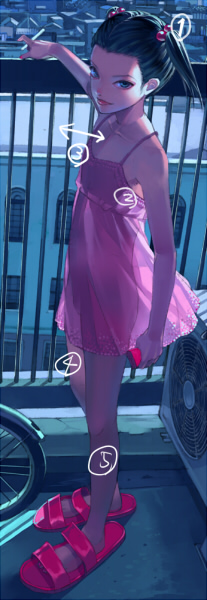
(1) 髪飾りは、プラスチックっぽくハイライトと反射光を強めに入れました。

(2)(4) 脇(わき)の辺りと左の足は、右側から当たる光が隙間から漏れるため、やや明るくしています。また、こうすることで脇に対する腕、左足に対する右足の距離も表現できます。

(3) 自転車編でも書きましたが、人物の後ろの空間が抜けているので背景と人物の色はかなり強めのコントラストをぶつけています。特に(3)のあたりは、顔に近いので目立たせたいという点でも効果的です。

(5) この辺りはほとんど光が当たっていないので、あまり描き込まずぼんやりとした色調で。

Next Page : 次のページ:いよいよ仕上げ〜完成までの最終工程!
123

Newest articles tagged IRADUKAI

  • The Making of 13 Copic Drawings - A Lesson in Coloring

    The Making of 13 Copic Drawings - A Lesson in Coloring

  • The Making of 15 Watercolor and Colored Pencil Drawings - A Glimpse Behind the Scenes

    The Making of 15 Watercolor and Colored Pencil Drawings - A Glimpse Behind the Scenes

  • Animations of Works In Progress - Capturing the Creative Process

    Animations of Works In Progress - Capturing the Creative Process

  • 3 Tips to Achieve Smooth and Cute Colors Using Gradients and Water! - Behold the Power of Water-Based Markers!

    3 Tips to Achieve Smooth and Cute Colors Using Gradients and Water! - Behold the Power of Water-Based Markers!

If you liked IRADUKAI, you will also love...

  • A making-of & interview with Kitsune: painting fantastic worlds with Adobe Photoshop CC

    A making-of & interview with Kitsune: painting fantastic worlds with Adobe Photoshop CC

  • Interview with the artist “Wannyanpuu” and making of “Ugoira!” The particulars behind the creator’s craftsmanship.

    Interview with the artist “Wannyanpuu” and making of “Ugoira!” The particulars behind the creator’s craftsmanship.

  • 13 Drawing Coloring Tutorials - Thick Painting

    13 Drawing Coloring Tutorials - Thick Painting

  • A light & portable device to draw wherever you want! New Windows 10 8-inch LCD Tablet "raytrektab" - Interview & Review with Saine

    A light & portable device to draw wherever you want! New Windows 10 8-inch LCD Tablet "raytrektab" - Interview & Review with Saine

  • Rella making-of and interview - Drawing a peaceful and elegant world with Adobe Photoshop CC

    Rella making-of and interview - Drawing a peaceful and elegant world with Adobe Photoshop CC

Share this article
  • Share
  • Post
  • Share
  • Post

Tags:

  • making-of
  • illustration material&software
  • author's commentary
  • IRADUKAI
  • SAI
Follow pixivision on Facebook!
Find us on X too!
Follow @pixivision
Stay updated with pixivision's daily features!

Newest articles tagged メイキング

  • The Making of 13 Copic Drawings - A Lesson in Coloring

    The Making of 13 Copic Drawings - A Lesson in Coloring

  • The Making of 15 Watercolor and Colored Pencil Drawings - A Glimpse Behind the Scenes

    The Making of 15 Watercolor and Colored Pencil Drawings - A Glimpse Behind the Scenes

  • Are you ready for Comiket? Useful Techniques For Your Event Booth

    Are you ready for Comiket? Useful Techniques For Your Event Booth

  • Wait a second! (Almost) Useless Tutorials

    Wait a second! (Almost) Useless Tutorials

View more▶︎

Follow pixivision's
official accounts!

p-chanMonthly Ranking
  • Illustrations

    Fan Art of Kisaki (Swimsuit) from B...

  • Illustrations

    Drawings of Patterned Bikinis - Pre...

  • Illustrations

    Drawings of Pools at Night - After ...

  • Illustrations

    Drawings of Flared and Frilled Biki...

  • Illustrations

    Drawings of Streaked Hair - Lucky S...

p-chanFeatured
  • Illustrations

    Fan Art of Tanjiro Kamado, Zenitsu ...

  • Illustrations

    Drawings of Heart Eyes - Love at Fi...

  • Illustrations

    Drawings of Characters on Beds - Re...

  • Interviews

    Behind the scenes with creator Okku...

  • Illustrations

    Drawings Featuring High-Neck Sleeve...

Follow pixivision's
official accounts!

  • Top
  • About pixivision
  • Suggest a theme
  • English
  • 简体中文
  • 繁體中文
  • 한국어
  • ภาษาไทย
  • Bahasa Melayu
  • 日本語
  • pixivision
  • About pixiv Inc.
  • Terms of Use
  • Contact Us
  • Advertising
  • Privacy Policy
©pixiv