• English
  • 简体中文
  • 繁體中文
  • 한국어
  • ภาษาไทย
  • Bahasa Melayu
  • 日本語
pixivision
Make it interesting
Explore
  • Illustrations
  • Manga
  • Novels
Create
  • Tutorials
  • Behind the Art
  • Materials
Discover
  • Interviews
  • Columns
  • News
  • Top
  • メイキング
  • 【講座】SAIメイキング by モツ子さん【お絵描きIRADUKAI もう一度読みたい講座特集3】
メイキング
2015.08.20

【講座】SAIメイキング by モツ子さん【お絵描きIRADUKAI もう一度読みたい講座特集3】

  • making-of
  • illustration material&software
  • author's commentary
  • IRADUKAI
  • SAI

3.塗り2

ツール:筆

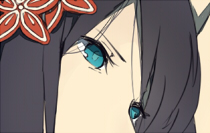
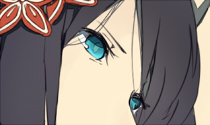
目

(1)目の全体に水色で乗算しました(濃くなればいいです):不透明度69%

(2)瞳を目の青色でスクリーン

(3)目の下にまた青で色を塗り「ぼかし」でちょっとぼかしたら発光にします:不透明度29%
髪

髪の下塗りレイヤーの上に新規レイヤーを作り(クリッピング)、だいたい頭のあたりに髪の毛の色を乗算で入れてぼかし、グラデーションをかけます。

もう一度新規レイヤーを作り(クリッピング)、肌の色を通常でかけ、上と同じようにぼかします。

それぞれいい具合になじむように不透明度を下げて完成です。

色をなじむようにするときはこの方法を使っています。ぼかしは便利でよく使います。これがないと絵が描けません。

次は地味に立体感を出します。絵によっては省くことも…


ツール:マーカー

うまく表現できませんが、マーカーだとアナログの水彩で描いたような雰囲気?を出せます!なんちゃって厚塗りするときにも使えるイイやつです。

↑イイとこのイメージ(アバウト)

これで肌を塗ってみます。新規レイヤーを作り(クリッピング)赤っぽい色で乗算しました。

不透明度を15%に下げて終わりです。

変わってるような変わってないような…?気持ち程度に!

着物にもかけます。影で描いたときと同じ色でがつがつ塗って乗算にします。水彩境界を使いました。ここは作業が同じなので省きます。

着物の花です。2種類の色をおいてぼかし、乗算します。

外側を着物のベースの青色でスクリーンをかけました。こんな流れで他もなじませていきます。

続いて髪飾りです。
ピンクの花に薄い効果がかかっていますが、これは形状とテクスチャを加えた筆で描いています。
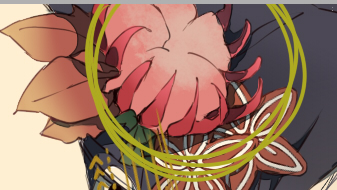
この効果はフリーで配布されているものをダウンロードして使っています。
色んな種類があるので、自分の絵にあったテクスチャを探したりするのもいいかもしれません´▽`
ブラシの効果以外にも、画材効果や用紙質感などもありますので探してみてくださいね。デジタルってすごいなぁ〜!

だいたい絵がなじんだら、線の色を変えてもっとなじませます。線画レイヤーの上に新規レイヤーを作り、おなじみのクリッピングをします。スクリーンを使うといい感じになります。不透明度を35%に下げます。

通常でクリッピングなし
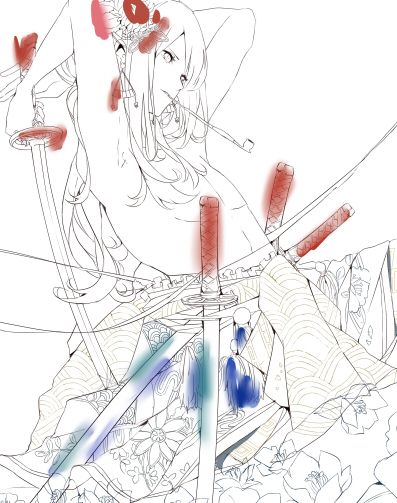
主にぼかしで乗算の繰り返しです。花を描き直しました。

影を見やすく表示するとこうなっています。着物の影が薄くなっているのは、マーカーで描いた部分です。

4.背景

脱線しますが、花とか手前にあるのでこれ背景に入らない…?前景っていうんですか?とりあえず背景ってことにしといてください〜(T.T)

人物と同じようにはっきり影まで塗っていきます。(効果は水彩境界のこと)

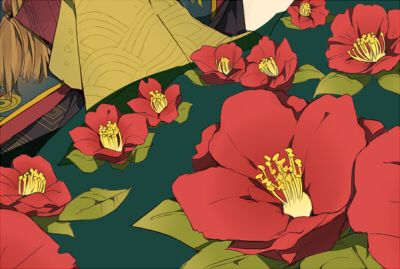
花

花びらに、中心にいくにつれて暗くなるようグラデーションをかけました(乗算)。葉は先が薄くなるようグラデーションをかけました(スクリーン)。雄しべは、紫色で同じようにスクリーンのグラデーションをかけます。

どちらも不透明度を適当に下げてあります。

次はマーカーで立体感があるように影をつけ、ぼかします。下切れてますやん…
葉も同じです。

花は難しいです;

水面

水も難しいですよね。よくわからんです。あまり参考にならないと思いますが;
水面レイヤーに花びらの赤や葉の緑、着物の色など水彩筆で描きます。水面に物体が反射して色が落ちているイメージです

落ちた色を塗って、その上から水の色をかぶせるように塗るとなじみます。

あとは混色や水分量などを自分流にアレンジしてみてください!


花のセットの上に新規レイヤーを作り、乗算で水を描き足しました。勢いで塗ります。

再び新規レイヤーを作り、水の色でスクリーンを使ってちょっと明るめにしてみました。人物と接する部分も少し明るく…
明るさをもっと出したい場合は、スクリーンより発光がオススメです。マーカーで勢いで塗ります。
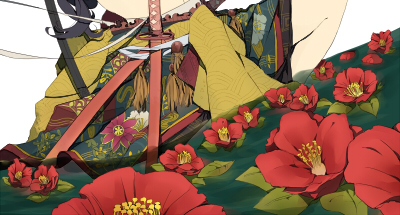
人物が沈んでるあたりを暗くなるように乗算して、さらにはっきりした葉の影(通常)も描き足しました。

何度か調節して挫折したのでここでやめます。勉強します…

次に、水面に人物を鏡のように映すため、ちょこっと面倒な作業をします。
一度人物レイヤーだけ表示しpngで別枠を「不透明度あり」にチェックし保存します。(不透明度にすると人物だけ切り抜かれて保存されますんだぜ)

pngで保存した画像を上下反転にして元のSAIに貼り付け、

/ギャーーーッ\

うまく水面に映るように回転やら形を変えたりして、不透明度を下げ、水面レイヤーにクリッピングして終わりです! 

刀

発光を人物のレイヤーセットごとクリッピングにかけます。→テクスチャを使った筆でカキカキ→水面同様に人物のコピーを貼り付けました。

全体に灰色を乗算してあります

刀は背景でも前景でもないですね。

Next Page : 次のページ:いよいよラストスパート!仕上げの工程です。
123

Newest articles tagged IRADUKAI

  • The Making of 13 Copic Drawings - A Lesson in Coloring

    The Making of 13 Copic Drawings - A Lesson in Coloring

  • The Making of 15 Watercolor and Colored Pencil Drawings - A Glimpse Behind the Scenes

    The Making of 15 Watercolor and Colored Pencil Drawings - A Glimpse Behind the Scenes

  • Animations of Works In Progress - Capturing the Creative Process

    Animations of Works In Progress - Capturing the Creative Process

  • 3 Tips to Achieve Smooth and Cute Colors Using Gradients and Water! - Behold the Power of Water-Based Markers!

    3 Tips to Achieve Smooth and Cute Colors Using Gradients and Water! - Behold the Power of Water-Based Markers!

If you liked IRADUKAI, you will also love...

  • A light & portable device to draw wherever you want! New Windows 10 8-inch LCD Tablet "raytrektab" - Interview & Review with Saine

    A light & portable device to draw wherever you want! New Windows 10 8-inch LCD Tablet "raytrektab" - Interview & Review with Saine

  • Interview with the artist “Wannyanpuu” and making of “Ugoira!” The particulars behind the creator’s craftsmanship.

    Interview with the artist “Wannyanpuu” and making of “Ugoira!” The particulars behind the creator’s craftsmanship.

  • A making-of & interview with Kitsune: painting fantastic worlds with Adobe Photoshop CC

    A making-of & interview with Kitsune: painting fantastic worlds with Adobe Photoshop CC

  • 13 Drawing Coloring Tutorials - Thick Painting

    13 Drawing Coloring Tutorials - Thick Painting

  • Rella making-of and interview - Drawing a peaceful and elegant world with Adobe Photoshop CC

    Rella making-of and interview - Drawing a peaceful and elegant world with Adobe Photoshop CC

Share this article
  • Share
  • Post
  • Share
  • Post

Tags:

  • making-of
  • illustration material&software
  • author's commentary
  • IRADUKAI
  • SAI
Follow pixivision on Facebook!
Find us on X too!
Follow @pixivision
Stay updated with pixivision's daily features!

Newest articles tagged メイキング

  • The Making of 13 Copic Drawings - A Lesson in Coloring

    The Making of 13 Copic Drawings - A Lesson in Coloring

  • The Making of 15 Watercolor and Colored Pencil Drawings - A Glimpse Behind the Scenes

    The Making of 15 Watercolor and Colored Pencil Drawings - A Glimpse Behind the Scenes

  • Are you ready for Comiket? Useful Techniques For Your Event Booth

    Are you ready for Comiket? Useful Techniques For Your Event Booth

  • Wait a second! (Almost) Useless Tutorials

    Wait a second! (Almost) Useless Tutorials

View more▶︎

Follow pixivision's
official accounts!

p-chanMonthly Ranking
  • Illustrations

    Fan Art of Kisaki (Swimsuit) from B...

  • Illustrations

    Drawings of Patterned Bikinis - Pre...

  • Illustrations

    Drawings of Pools at Night - After ...

  • Illustrations

    Drawings of Flared and Frilled Biki...

  • Illustrations

    Drawings of Streaked Hair - Lucky S...

p-chanFeatured
  • Illustrations

    [Featured Articles] Fan Art of the ...

  • Illustrations

    Drawings of Characters with Black H...

  • Illustrations

    Announcing the Results of pixiv’s K...

  • Illustrations

    Fan Art of Cyrene from Honkai: Star...

  • Illustrations

    Drawings of Side Ponytails - The Wi...

Follow pixivision's
official accounts!

  • Top
  • About pixivision
  • Suggest a theme
  • English
  • 简体中文
  • 繁體中文
  • 한국어
  • ภาษาไทย
  • Bahasa Melayu
  • 日本語
  • pixivision
  • About pixiv Inc.
  • Terms of Use
  • Contact Us
  • Advertising
  • Privacy Policy
©pixiv